There was a question in the forum about how to achieve this bands show schedule:

It is also demo’ed at http://icscalendar.com/agenda-styles/a-gigpress-listtype/. You can either follow the instructions below, or simply cut and paste the listtype to your listtype overview screen.
Instructions:
- Either edit and existing agenda style list type, or
- create a new one, then copy (cut and paste) a existing one into your new one.
- then….
Configure the listtype as follows:
Fields to show:
| Field | Column | Order | Before |
|---|---|---|---|
| EventDate | 1 | 10 | |
| Location | 2 | 10 | |
| Summary | 2 | 20 | |
| url | 2 | 30 | |
| Description | 3 | 10 | |
| Starttime | 3 | 15 | Time: |
| Map | 3 | 15 | |
| Addevent | 3 | 15 | |
| Subscribe event(if using amrevents with internal events) | 3 | 15 |
Date and Time Formats:
- Change day to : m/d/Y
Grouping:
- Check month is ticked for the grouping
Icon Size
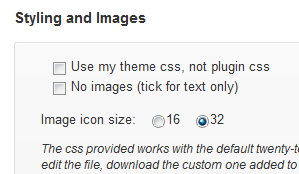
Lastly, if you want the larger icons, go to the general Listing settings => styling and images
- Check icon size 32
Optionally, you could also fiddle around with your css to make that column 3 a fixed width perhaps?
The listtype preconfigured:
[private]
Please ensure you cut and paste cleanly the whole piece of text:
[/private]